
Our customers love working with tasks in Conductor — in fact, it’s a core component of the strategy execution platform! To make this key tool as adaptable as possible to our customers’ preferred way of working, we’re launching a great new way to visualize their tasks and give everyone a better sense of project status at-a-glance, across a wide variety of dimensions.
For example, some customers wanted to visualize a sales pipeline and organize their task to quickly see which leads are in the qualification stage vs. the proposal stage.
Other customers wanted to visualize their workflows. For instance, a financial organization may want to visualize the approvals required before implementing a new business process. A software development team might want to see which tasks are in progress, ready for testing, or ready for launch.
Across the different uses, the request was consistent: “We want to quickly stand up a Kanban board in Conductor, add some columns, and get started managing tasks.” We took this as our starting place and used it as a jumping off point for how to “Conductorize” the standard task board.
Structure, your way
We love the idea of boards to visualize tasks, but the lack of structure in other tools like Trello wasn’t something that we felt would serve the long-term product vision.
Conductor is designed with visibility and governance in mind. Project leads across multiple workstreams, in different regions around the world, can manage their projects in a single standardized source of truth, which allows them to roll up that info and gain valuable insights. We wanted to make sure boards were built with these values in mind.
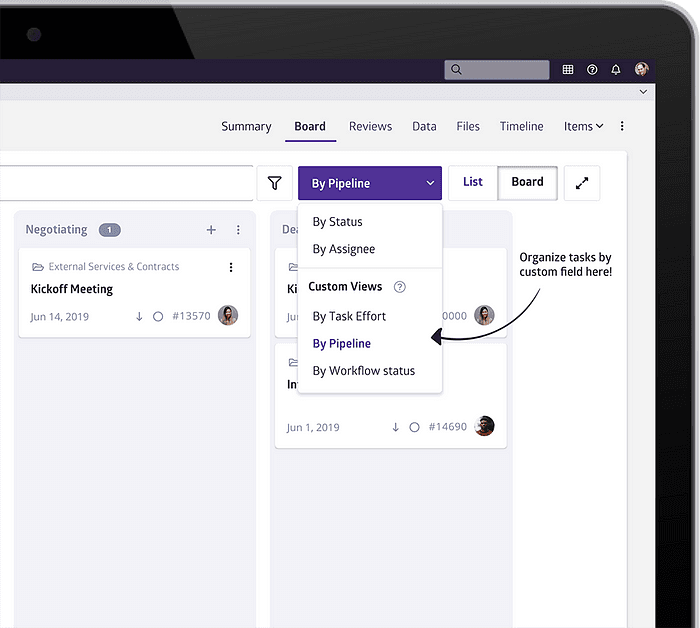
To do that, we designed Conductor’s boards to group tasks by status, by their assignee, and by a new feature we built in parallel with task boards: custom fields.
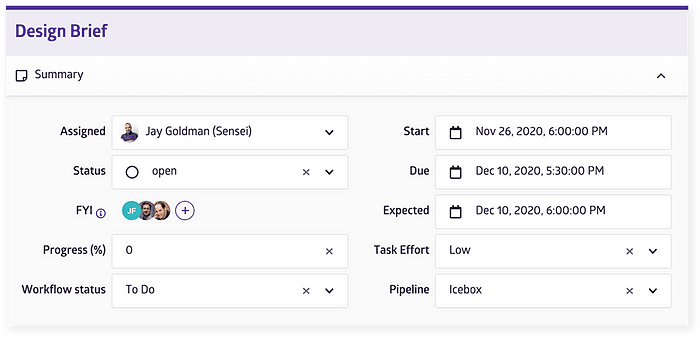
Customers can add a new custom field to complement our existing set of attributes (for example, due date, assigned user, project name). That new attribute is managed by an administrator and available for all tasks within the initiative. Here are just a few examples of the many ways you can use custom fields:
- To provide a rough estimate of task effort (small, medium, large)
- To identify workflow status (to do, in progress, requires approval, approved, completed)
- To associate a task with a certain business category
Now, you have the ability to visualize tasks, but in the Conductor way! Boards can be pivoted on and viewed by a set of custom field value, where each column in the board is represented by a different value. Having board columns actually mean something in this way is so much more powerful and enables you to organize your tasks in whatever way best suits your working style and how your project is structured.
Frequently asked questions
Does Conductor have Kanban boards?
Yes. Conductor's task boards let teams visualize tasks as Kanban-style columns grouped by status, assignee, or any custom field. Customers use them for workflow stages, approval sequences, sales-pipeline style tracking, and development states such as in progress, ready for testing, and ready for launch.
How are Conductor's task boards different from Trello?
Structure. Trello-style boards are unstructured, which doesn't support governance or roll-up across workstreams and regions. Conductor's boards group tasks by attributes that mean something, status, owner, or an admin-managed custom field, so the same tasks feed the standardized source of truth that program-level reporting depends on.
What are custom fields in Conductor?
Administrator-defined attributes added to every task in an initiative, alongside built-ins like due date, owner, and project. Examples include effort size, workflow status, or business category. Boards can pivot on any custom field, with each column representing one value, so the board reflects how the project is actually structured.